Troubleshoot: A Bold Brush Script for Lasting Impressions
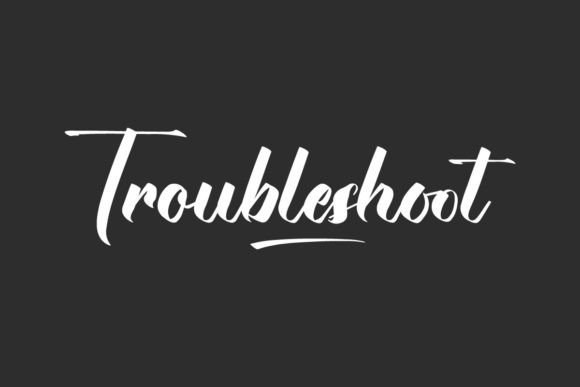
In a world saturated with minimalist sans serifs and geometric logos, there’s a certain power in a typeface that embraces its human origins. Troubleshoot is a premium font that does exactly that. It’s not just another script; it’s a classic brush script with a distinct calligraphy style, crafted with bold, confident lines. This isn’t a delicate, whispering font. Troubleshoot speaks with clarity and presence, designed to make a statement while remaining remarkably easy to read. For designers, entrepreneurs, and creators, it offers a unique blend of artistic flair and practical utility.
The Visual Personality: More Than Just Swashes
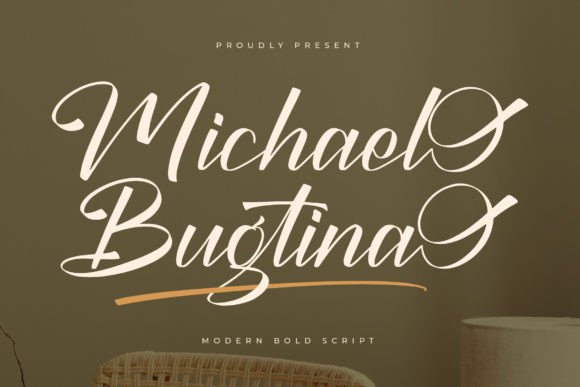
At its core, Troubleshoot is a display font, meaning it’s built for impact. Its character comes from the intentional, hand-drawn quality of its strokes. The letters connect with a natural flow, mimicking the pressure and release of a real brush or nib pen. However, unlike many purely decorative handwritten fonts, its letterforms are structured and balanced. The bold weight ensures it holds its own against busy backgrounds or in small-scale applications like packaging. This combination of organic texture and robust construction gives it a versatile personality—it can feel both artisanal and professional, romantic and reliable.
This visual style places Troubleshoot in a valuable niche. It’s more personal and expressive than a serif font, yet more structured and intentional than a casual, everyday script. Think of it as the typographic equivalent of a well-tailored blazer with a touch of artistic flair. It communicates craftsmanship, attention to detail, and a brand that values both tradition and contemporary appeal.
Where This Creative Font Truly Shines
The true test of any design asset is its application. Troubleshoot’s balanced boldness makes it a surprisingly adaptable player across numerous projects. Its strength lies in adding a human touch where it’s needed most.
- Branding & Identity: For businesses in the accessories, boutique, café, florist, jewelry, perfume, spa, and wedding industries, this font can become the cornerstone of a brand identity. It’s perfect for crafting a memorable logo, a distinctive brand name, or elegant packaging for skin care products. Its calligraphic roots suggest quality, care, and a personal touch, which directly influences brand perception.
- Marketing & Advertising: Use it to create high-impact headlines for advertisements, social media graphics, and event posters. In a feed full of standard typography, a well-placed headline in Troubleshoot can stop the scroll. It’s particularly effective for promotions, sale announcements, and any call-to-action that needs to feel inviting rather than aggressive.
- Publishing & Editorial Design: In editorial design, it’s an excellent choice for chapter titles, pull quotes, or feature story headers in magazines and blogs. It adds a layer of sophistication and visual interest to publishing projects without compromising the readability of body text, which should always be set in a complementary serif or sans serif font.
- Digital & Web Design: While primarily a display font, strategic use in web design can elevate a user experience. Think hero section text, special landing pages, or email newsletter headers. Its bold nature ensures it remains legible even on various screen resolutions.
- Personal & Commercial Projects: Beyond commercial use, it’s a fantastic tool for crafters and hobbyists. Create custom invitations, greeting cards, quote prints, or branded materials for a small business. As a commercial font, it provides the professional polish needed for items intended for sale or public display.
Making It Work: Practical Guidance for Designers
Choosing the right font is only half the battle; using it effectively is what creates great design. Here’s how to integrate Troubleshoot into your workflow with purpose.
Evaluate the Project Fit: Ask yourself: does the project call for warmth, personality, and a crafted feel? If you’re designing for a tech startup or a law firm, Troubleshoot might not be the right choice. But for a local bakery, a lifestyle brand, a wedding stationery suite, or a handmade goods store, it’s often a perfect match. It’s a font that builds connection.
Master the Font Pairing: This is critical. As a strong script, Troubleshoot needs a calm, supportive partner. The goal is visual hierarchy and readability. Pair it with a clean, neutral sans serif font for a modern, balanced look (e.g., Montserrat, Lato). Alternatively, pair it with a classic, readable serif font for a more traditional, elegant feel (e.g., Lora, Merriweather). Avoid pairing it with other decorative or script fonts, as this creates visual chaos.
Test for Readability: Always test your chosen text in context. Troubleshoot’s bold style is legible, but it’s still a script. For body copy, it’s a definite no. Use it for short, impactful headlines, logos, and accents. View it at the intended size—whether on a business card or a billboard—to ensure every letterform is clear. The included styles and weights (if any) should be reviewed to see if a lighter weight offers better versatility for your specific needs.
Understand the Licensing: As with any premium font, check the licensing terms. Most commercial font licenses cover use across digital and print, but it’s essential to verify if your specific use case—like embedding in an app or using on mass-produced merchandise—is included. This step protects you and respects the work of the type designer.
Troubleshoot isn’t a font for every occasion, and that’s its strength. It’s a specialized tool in your design assets library for when a project needs to communicate authenticity, elegance, and bold personality. By understanding its visual characteristics and applying it with thoughtful pairings and purpose, you can leverage its unique appeal to create designs that are not only beautiful but strategically effective. In the end, the best modern typography choices are those that serve the story you’re trying to tell. For many stories, Troubleshoot tells it beautifully.